
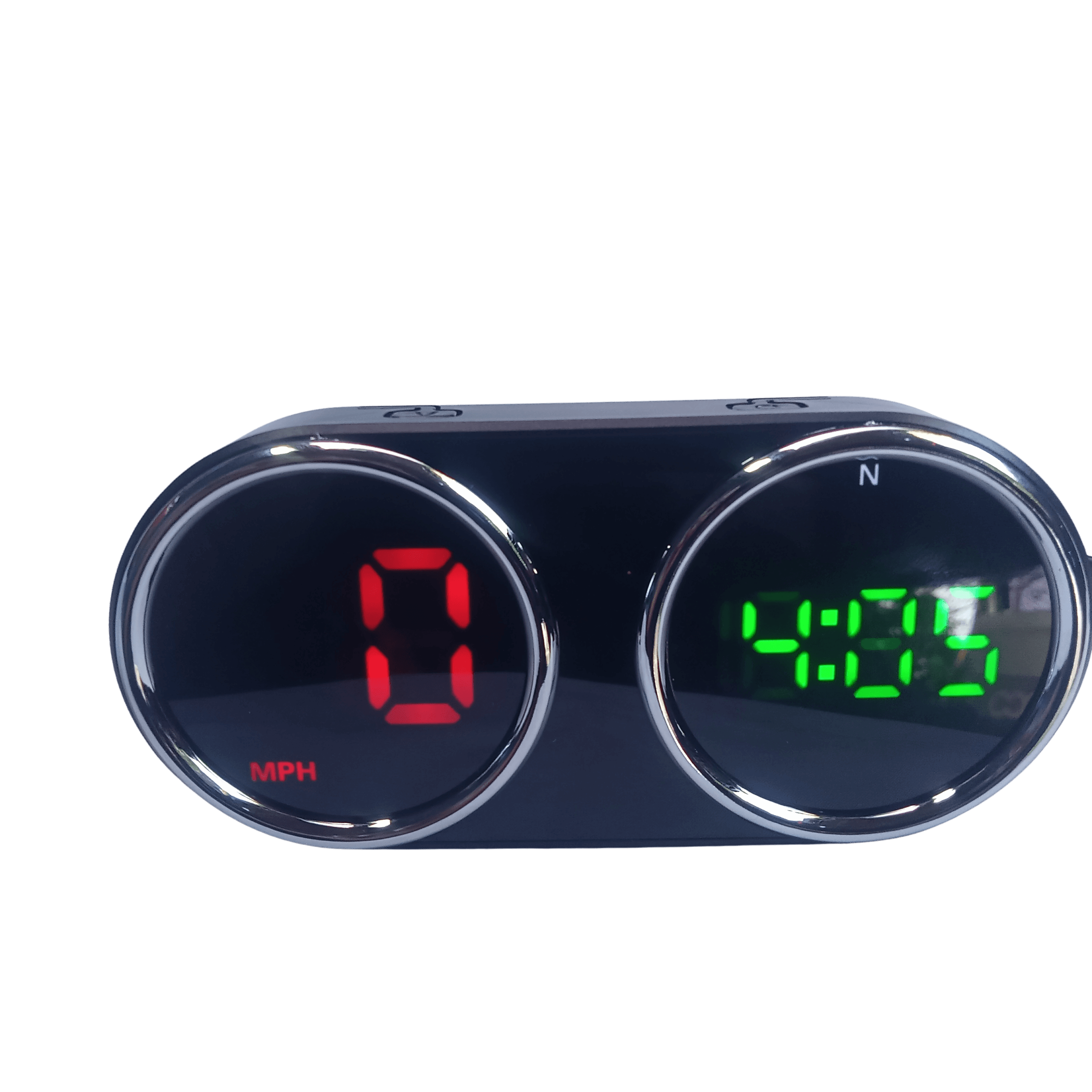
HUD Display
Includes all applicable Sri Lankan taxes. Islandwide delivery calculated at checkout.
Product Overview & Specifications
Universal GPS Head-Up Display (HUD) Speedometer
How It Works (The Logic): This device operates 100% via GPS. It does not pull data from your car's engine computer (OBD2). Instead, it connects directly to satellites to calculate and display your real-time speed, local time, and driving direction.
Key Features & Operation:
- Multi-Function HD Display: Clearly displays your vehicle's speed, local time, and compass direction (N, S, E, W) on a high-definition digital screen that remains visible even in strong sunlight.
- 7 Adjustable Colors: Short press the Right button to cycle through 7 different display colors to match your personal preference or dashboard lighting.
- One-Touch Speed Unit: Short press the Left button to instantly toggle the speed reading between Kilometers (KM/H) and Miles (MPH).
- Overspeed Alarm Setup:
- Long press the Right button to enter the setting mode (the speed limit value will flash).
- Short press the Right button to increase the value (+10 per press, range 10-120).
- Short press the Left button to reduce the value.
- Universal Compatibility: Works seamlessly on any vehicle—petrol, diesel, hybrid, EV, trucks, and vans.
Installation Guide:
- Connect the provided USB cable (Included) to the HUD unit.
- Plug the other end into a standard 5V USB Car Charger (NOT Included).
- ⚠️ WARNING: Do NOT hardwire this directly to a 12V power line in your car. The device requires a 5V USB power source. Connecting it directly to 12V will instantly fry the circuit.
- Place the device on your dashboard for instant use. It is strictly plug-and-play; no complex wiring or professional installation is required.
ක්රියාත්මක වන ආකාරය (How it Works): මෙම උපකරණය 100% ක්ම ක්රියාත්මක වන්නේ GPS තාක්ෂණයෙනි. මෙය වාහනයේ පරිගණකයට (ECU/OBD2) සම්බන්ධ නොවන අතර, චන්ද්රිකා (Satellites) මගින් ඔබේ වාහනයේ නිශ්චිත වේගය, වේලාව සහ ගමන් කරන දිශාව ඉතා නිවැරදිව ගණනය කර පෙන්වයි.
ප්රධාන අංග සහ භාවිතා කරන ආකාරය (Key Features & Operation):
- ප්රධාන පහසුකම් (Multi-Function Display): වාහනයේ වේගය (Speed), වේලාව (Time) සහ ගමන් කරන දිශාව (Compass direction) ඉතා පැහැදිලිව මෙම ඩිජිටල් තිරයේ දිස්වේ.
- වර්ණ 7කින් සැකසීම (7 Colors): දකුණු පස බොත්තම (Right button) කෙටියෙන් එබීමෙන් තිරයේ දිස්වන අකුරු වල වර්ණය, වර්ණ 7ක් අතුරින් ඔබට අවශ්ය පරිදි වෙනස් කරගත හැක.
- වේග මිනුම වෙනස් කිරීම: වම් පස බොත්තම (Left button) කෙටියෙන් එබීමෙන් වේග මිනුම KM/H සහ MPH අතර පහසුවෙන් මාරු කළ හැක.
- අධික වේග අනතුරු ඇඟවීම (Overspeed Alarm):
- දකුණු පස බොත්තම තත්පර කිහිපයක් (Long press) ඔබාගෙන සිටීමෙන් Setting mode එකට පිවිසිය හැක (එවිට තිරයේ අගය Flash වේ).ඉන්පසු දකුණු බොත්තම එබීමෙන් අගය 10 බැගින් වැඩි කළ හැක (උපරිමය 120).වම් බොත්තම එබීමෙන් එම අගය අඩු කළ හැක.
- ගැලපීම (Universal Compatibility): පෙට්රල්, ඩීසල්, හයිබ්රිඩ් හෝ ඉලෙක්ට්රික් (EV) යන ඕනෑම වාහනයකට ගැලපේ.
සවි කිරීමේ උපදෙස් (Installation Guide):
- පැකේජය සමඟ ලබා දී ඇති USB කේබලය (Included) උපකරණයට සම්බන්ධ කරන්න.
- කේබලයේ අනෙක් කෙළවර ඔබේ වාහනයේ ඇති 5V USB Car Charger එකකට සම්බන්ධ කරන්න. (Car charger එකක් මෙහි අන්තර්ගත නොවේ - NOT included).
- ⚠️ දැඩි අවවාදයයි: මෙය කිසිවිටෙකත් වාහනයේ 12V බැටරි ලයින් එකට (Direct line) කෙලින්ම වයර් කරන්න එපා. මෙය ක්රියාත්මක වන්නේ 5V බලයකින් පමණි. 12V ලබා දුනහොත් පරිපථය ක්ෂණිකව පිලිස්සී යනු ඇත.
- උපකරණය ඩෑෂ්බෝඩ් (Dashboard) එක මත තබාගන්න. කාර්මිකයෙකුගේ සහායක් අවශ්ය නැත (Plug-and-play).
Product ID: ES-2020